Mantex

Tutorials, Study Guides & More

  • HOME
  • REVIEWS
  • TUTORIALS
  • HOW-TO
  • CONTACT
>> Home / Archives for 2009

Archives for 2009

How to create good page layout

September 15, 2009 by Roy Johnson

basic principles of effective page design
Good Page LayoutGood page layout
More and more people today are using computers for essay and project writing. The advantages for improved presentation are dramatic. Once most people have started to enjoy the facilities computers offer for editing, rewriting, and presentation, they often wonder how they ever managed without them. Typewriters become a thing of the past.

Editing
The main advantage of the computer is that you can rewrite and edit what you produce. You might start out with just a sketchy outline, but you can add extra examples, delete mistakes, and move paragraphs around. You can build up to the finished product in as many stages as you wish.

First drafts
At first you might want to carry on producing the first draft of your work in hand-written form. You type it into the computer’s memory or onto disk. Then you can edit what you have produced, either on screen or by printing out your document. This is quite common for beginners. Most people abandon the handwriting stage in a gradual manner.

On-screen editing
At first, you will probably want to see what you have written printed out as soon as possible. As you gain experience however, you will probably edit on screen and only print out the finished version of your work. WYSIWYG word-processors (What You See Is What You Get) allow you to see on screen what the finished document will look like.

Presentation
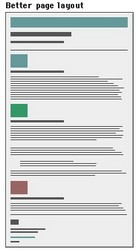
The most important element of presentation is the layout of the page. No matter what the content of your work, it will look better if is given plenty of space in which to ‘breathe’. You should leave plenty of blank space around what you write. Do not attempt to cram the maximum amount of text onto each page. If you are using any sort of pictures, tables or visually quoted material, let it stand well clear of the text.

Margins
Learn how to set generously wide margins. One inch minimum at the top and bottom of the page is normal. One inch or more at each side. If your work is going to be presented in a folder or binder, you should also allow at least 0.25″ ‘binding offset’ (also called a ‘gutter’).

Columns
If your piece of work is anything like a newsletter, a magazine, or a popular report, you might wish to use multi-column layout. On A4-sized paper, two columns will probably be appropriate, but you might choose three if you reduce the size of the left and right margins. If you find working in columns difficult, prepare your text separately first. Your final task will then simply be one of laying out the page.

Line spacing
The computer and printer will produce your work very neatly, but will probably do so by using single line spacing. Even though you are likely to be pleased by the neatness, learn how to set for one-and-a-half or double line spacing. This will give you more opportunity to create good layout.

Fonts
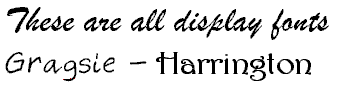
For the main text of your work, choose a font with serifs such as Times New Roman or Garamond. Avoid the use of sans-serif fonts such as Arial or Helvetica. These make continuous reading difficult. Unless your work is connected with fine arts, advertising, or graphic design, avoid using fancy display fonts (such as Poster or ShowTime) altogether: these are designed for advertising and shopfront display.

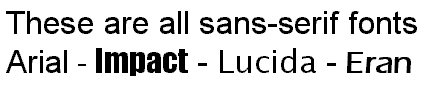
Display fonts

Fontsize
In general, the size of your chosen font should be eleven or twelve points. This will make your work easy to read, and the font will appear proportionate to its use when printed out on A4 paper. You might wish to use large font sizes of fourteen-point size for subheadings, and sixteen or eighteen point for main headings. Long quotations (where necessary) are normally set in eleven or ten-point size.

Font variety
Although you may have a wide range of fonts at your disposal, you should keep the number you use to a minimum. Two or at the very most three different fonts will be enough for most pieces of work. On this issue, graphic designers have an expression – “More is less” – which means that the greater the number of different fonts used on a document, so the less effective they become.

Justification
Most word-processors will produce your work with the text ‘fully justified’ – that is, with both left and right hand edges aligned. This will produce a neat overall impression. However, it can cause ‘rivers’ of white space to appear in the text, caused by irregular spaces between the words. You may wish to choose left-justification (like this paragraph). This will leave the right-hand edge ragged, but the spaces between the words will be regular. If in doubt, full justification usually offers more overall neatness on the page.

Indentation
If your work contains items such as numbered lists, columns of figures, or anything else which is set off from the left hand margin, always use the TAB key or the INDENT command to position the item. Never use the spacebar: this will not help you to achieve precise alignment. ‘The word-processor is not a typewriter’. Take full advantage of any facilities for indenting to regularise your presentation of quotations. Double indentation is for those longer quotations that would otherwise occupy more than two or three lines of the text in your work. Try to be consistent throughout.

Quotations
Long quotations (where necessary) should normally be set in the same font as the body of your essay. The size however may be reduced by one or two points. This draws attention to the fact that it is a quotation from a secondary source. Alternatively (and in addition) it may be set in a slightly different font – but don’t use too many different fonts.

Paragraphs
If you use double spaces between each paragraph, you do not need to indent the first line. [This is only necessary when there are no spaces between the paragraphs.] One good reason for having the double spaces, apart from its looking more attractive, is that it will help you to ‘see’ each paragraph as a separate part of your argument or discussion.

Page numbering
Learn how to switch on automatic page numbering for all your essays and projects. The numbers should normally be placed at the bottom of the page, either in the middle or in the right-hand corner. You may also place page numbers in page ‘footers’ – that is a piece of text which occurs at the bottom of every page.

Spelling
If your word-processor has a spell-checking facility, then use it before you print out your document. But remember that it is unlikely to recognise specialist terms and unusual names such as Schumacher, Derrida, or Nabokov. These will not be in the processor’s memory. You will have to check the correct spelling of these yourself, as you will any other unusual words. Remember too that a spell-checker will not make any distinction between They washed their own clothes and They washed there own clothes, because the word there is spelt correctly even though it is being used ungrammatically.

Grammar-checkers
If your word-processor has a grammar checker, use it before you finalise your document. These devices are very useful for spotting over-long sentences, awkward syntax, missing verbs, and all sorts of grammatical errors. You might find them annoying to use at first, but the best of them will offer you advice and potted lessons as well as corrections of any errors. Persist, but be careful: even machines can sometimes be wrong.

Book titles
Use the italics or the bold commands of a word processor to indicate the titles of books – but remember to be consistent throughout your document. A.J.P. Taylor’s The Origins of the Second World War is just as acceptable as Margaret Mead’s Coming of Age in Samoa though the former is more usual and preferable.

Footnoting
Advanced users may well be tempted to take advantage of automatic footnoting facilities. Word-processors can certainly remove all the headaches from this procedure. However, do not clutter your text with them just for the sake of showing off your command of the technology. Numbered endnotes are much easier to use and to control.

Hyphenation
If your word-processor automatically hyphenates words at the end of a line, take care to read through the work before you make your final print-out. Eliminate any howlers such as ‘the-rapist’ and ‘thin-king’. This needs to be done with extra care if you are using newspaper columns.

Widows and orphans
In laying out your pages, avoid creating paragraphs which start on the last line of a page or which finish on the first of the next. These are called, in the jargon of word-processing, ‘Widows and Orphans’. The solution to this problem is to control the number of lines on a page so as to push the text forward. An extra-large gap at the bottom of a page looks better than an isolated single (or even double) line of text.

Titles
Titles, main headings, or essay questions may be presented in either a slightly larger font size than the body of the text. They may also be given emphasis by the use of bold. You should not use continuous capital letters in a title, heading, or question. This looks typographically ugly. Do not underline headings: this makes them more difficult to read.

Emphasis
Although many people think it is good idea, there should be no need to underline something to give it emphasis. If you have a title, heading or a question at the head of a piece of work, then a larger font, and the use of bold and double spacing will be enough to give it emphasis and importance. Underlining any text makes it harder to read.

Italics
Italics are normally used to show emphasis – when something is very important. They are also used to indicate a word of foreign origin, such as ouvrier (French – workman) or nihil (Latin – nothing). Book titles should be shown in italics – such as War and Peace. Smaller pieces of work such as stories, articles, and poems are shown by putting the title in single quotation marks. For instance, ‘The Fall of the House of Usher’.

Print-preview
Use the print-preview facility to help you lay out the contents of a page before you print it. Get used to the practice of switching between draft mode and print-preview. In draft mode, you view the text in detail and you can make fine adjustments to what you have written. In print-preview, you have a one-page overview of your text. Make sure that your text is properly aligned and laid out on the page. Check the spacing of paragraphs and the appearance of your text. Ensure that your titles, subtitles, and any section headings are set at the correct fontsize and weight.

© Roy Johnson 2004


More on How-To
More on literary studies
More on writing skills


Filed Under: How-to guides, Study Skills Tagged With: Graphic design, Page layout, Page presentation, Presentation, Study skills, Text presentation

How to deal with .exe files

September 14, 2009 by Roy Johnson

procedures for dealing with executable files (programs)

.exe files

.exe files These notes will help you to understand .exe files.
.exe files They tell you how to dowload them and save them.

.exe files You can print out these notes for reference.

.exe files Soon, you won’t need them any more!


1. These .exe files are information which has been compressed to take up less space.

2. They can also be downloaded and extracted without the unzipping process.

3. The really good news is – they unzip themselves!

4. You download them in the same way as any other file.

5. See downloading instructions for details.

6. Go to the Internet site and download your .exe file.

7. A dialogue box will ask you if you wish to save the .exe file into a directory.

7. Don’t worry about this process. You can remove or delete anything later if you change your mind.

8. For instance, you might be asked to download file filename.exe into the suggested directory [or folder]:

C:FOLDERfilename.exe

9. If a dialogue box pops up and asks – ‘Create directory C:FOLDER ?’ – you should say ‘Yes’.

10. This puts the file filename.exe which you want to download into a directory called FOLDER.

11. This directory is created automatically on your hard disk.

12. You can give it another name if you wish:

C:MYSTUFFfilename.exe

13. Remember – you can delete it all later if you wish.

14. Now you can log off the Internet if you are on a dialup connection.

15. Go to your Windows file manager. This is ‘Windows Explorer’ in Win95 and later. [Not to be confused with Internet Explorer.]

16. Locate the directory FOLDER which has been created.

17. The file filename.exe will be in the directory.

18. Double-click on the file. This activates it.

19. Another dialogue box comes up, asking where you wish to place the file.

20. You could type C:MYSTUFF or C:TEMP

22. Choose your directory, say OK, and the file will be unzipped into the place you choose.

23. Voila! It all happens automatically – and very quickly.

24. You can now open the file which has extracted itself.

25. Do this by double-clicking on it.

25. These files will be automatically opened by the following programs:

.txt files – Windows Notepad

.doc files – Microsoft Word

.htm files – Firefox or Internet Explorer

© Roy Johnson 2004


More on How-To
More on literary studies
More on writing skills


Filed Under: How-to guides Tagged With: .exe files, Computers, Executable files, Technology

How to download files

September 15, 2009 by Roy Johnson

what to do when you are asked to download a file

Download files

Stage one

1. Click on the item you wish to download.

2. If you choose an .htm file, you will read it immediately in your web browser.

3. You can save the file – or print it.

4. Choose FILE/PRINT or FILE/SAVE AS in your browser menu.

5. If it’s a .zip or an .exe file, your browser will open a dialogue box when you click the file.

6. This gives you the option to save the file into a directory or folder.

7. This can be saved onto your hard disk or a floppy disk.

8. For example you could choose –

C:MANTEXfilename.exe
A:MY-STUFFfilename.zip

9. Files with a .zip extension are compressed.

10. You need to unzip these files before they can be read.

11. See ‘How to zip & unzip files’ for details.

12. Files with an .exe extension are ‘self-extracting’.

13. These activate themselves automatically.

14. See ‘What to do with .exe files’ for instructions.


Stage two – EXTRACTING FILES

1. When you have finished downloading the file…

2. …log off the Web and go to your file manager.

3. Locate the file on your hard disk or floppy disk.

4. If it’s a .zip file you need to unzip it.

5. It’s safer to copy big .zip files onto your hard disk.

6. If it’s an .exe file, double-click on the file.

7. A dialogue box will appear on screen.

8. In the dialogue box, choose EXTRACT.

9. Say “Yes” to ‘Create C:SOMENAME directory?’

10. This will extract all files into a folder called SOMENAME.

11. You can change this name if you wish.


Stage three – VIEWING IN A BROWSER

1. Our software programs can be viewed in a browser.

2. Open your resident Web browser [Netscape or Explorer].

3. Choose FILEOPEN PAGE [or type in the address box].

4. Select C:SOMENAMEfilename.htm

5. The programs are opened with the first file in the list

homepage.htm starts WRITING ESSAYS

aa-start.htm starts ENGLISH LANGUAGE

aa-start.htm starts STUDY SKILLS

6. View the first few sample pages of the program

7. Three sample essays are also included in WRITING ESSAYS:

‘Bibliographic Studies’

‘Classical Civilization’

‘Current Affairs’

8. Exercises are included in ENGLISH LANGUAGE

9. Four whole sections are viewable in STUDY SKILLS

  • Computers
  • Examinations
  • Layout
  • Questions

10. Hyperlinks are shown, but the pages may not be available

11. [Choose a sans-serif font at 12 points in your browser]

NB! USERS ON A NETWORK

1. Your computer may be on a network.

2. This is very common in education and businesses.

3. You might not be able to download to hard disk.

4. In this case, download onto a floppy disk.

5. Remember that floppies only hold up to 1.4 MB.

6. Both .exe and .zip files will expand when extracted.

7. That is, an .exe file of 800K might become 2.5MB of data when it is expanded.

© Roy Johnson 2004


More on How-To
More on literary studies
More on writing skills


Filed Under: How-to guides Tagged With: Computer files, Computers, Downloading, Downloading files

How to fail at web design

September 16, 2009 by Roy Johnson

classic guidelines which mean you can’t go wrong

Web design fail- guarantee disaster

Web design failure is fairly easy. Just follow any of the following guidelines. And if possible, try to combine at least two or three.

1. Have your whole site in one page, then you won’t have to bother with navigation buttons.

2. Put a huge graphic on the entry page, before the content of your site. It’s not your fault if visitors have a slow connection.

3. Nobody minds the odd broken link.

4. Use animated GIFs liberally. These are very amusing.   web design fail

5. Have the site in at least three frames.

6. Web sites without background wallpaper are dull.

7. Use lots of different fonts. Everyone has the same fonts installed these days.

8. Red text on a coloured background looks really good – as you can see.

9. Use plenty of underlining. This will draw people’s attention to the important parts of your message.

10. Better still, show people you mean business by highlighting lots of your text. This can be done at random, but it’s best used on special offers. It also looks really COOL!!!!!

11. Combine these features wherever possible, centre your text, add colour, and make sure your punters customers get the message. Get Ready For More Backlinks,

More Traffic And Higher Search Engine Rankings Almost Instantly!

12. Decorate pages with page counters, clip art, and and plenty of horizontal rules.

13. This is the Internet, so you don’t have to worry about speling and punctuatio

14. If some pages are unfinished, just paste in an “Under Construction” sign.

15. HAVE ALL YOUR TEXT IN CAPITALS – AS IT MAKES IT MUCH EASIER TO READ. JUST LOOK AT THIS REALLY GOOD EXAMPLE.

16. Once you’ve got your site, make sure that you publicise it as widely as possible. If you are not certain which groups to post to, you should post to as many as possible.

17. Ensure your message gets through by posting it at least three times. Repeat these postings on a daily basis.

18. If in any doubt, copy other people’s great ideas.

© Roy Johnson 2004


More on How-To
More on literary studies
More on writing skills


Filed Under: How-to guides Tagged With: HTML-XML-CSS, Web design

How to fail your dissertation

September 15, 2009 by Roy Johnson

clear guidelines for guaranteed disaster

Failing your dissertation is admittedly not an easy task, but if you try really hard you can fail by ignoring all the good advice you have been given. If in doubt, you should adopt the suggestions which follow. They can be summarised as three main principles:

  • obscure the idea
  • mangle the sentences
  • ‘slovenize’ the diction
Obscure the idea

Make sure your topic is wide and vague. Then wander around the main idea without ever stating it precisely. If by mistake you do manage to choose a well-defined, suitably limited topic, do not despair. You can always take detours and amble away from the topic for a while.

Do not develop your ideas. Simply re-state them in safe, spongy generalisations. Don’t bother finding evidence to support what you say. Always point out this kind of repetition with the phrase ‘As previously …’. Better still, repeat word for word at least two of your statements.

Disorganise your discussion. For example, if you are using chronological order to present your material, keep your reader alert by making repeated jumps from the past into the present and back again.

Begin a new paragraph every sentence or two.

By generous use of white space make the reader aware he is looking at a page devoid of sustained thought.

Like this.

Mangle the sentences

Fill all the areas of your sentences with dead wood. Incidentally, ‘the area of’ will deaden almost any sentence, particularly when displayed prominently at the beginning.

Use sentence fragments and run-on or comma-spliced sentences. Do not use a main subject and a main verb, because the reader will get the complete thought too easily. Just toss in part of the idea at a time, as in this ‘sentence’.

To create variety, throw in an occasional run-on sentence, thus the reader will have to read slowly and carefully to get the idea, if there is one.

Your sentence order invert for statement of the least important subject matter. That will force the reader to be attentive to understand even the simplest points you make.

You, in the introduction, body and conclusion of your dissertation, to show that you can contrive ornate, graceful sentences, should use convoluted sentence structure.

Frequent separation of subjects from verbs by insertion of involved phrases and clauses, frequently giving rise to errors of concord, show that you know what can be done to a sentence.

‘Slovenize’ the language

Add the popular ‘-wise’ and ‘-ize’ endings to words. Say ‘Timewise, this procedure is faster’, rather than simply, ‘This procedure is faster’. Choose ‘circularize’ and ‘utilize’ in preference to ‘circulate’ and ‘use’. Practice will smartenize your style.

Use vague words instead of precise ones. From the start, establish vagueness of tone by saying ‘The thing is …’. Keep the reader guessing throughout a reading of your work.

Employ lengthy Latinate locutions wherever possible. Shun the simplicity of style that comes from apt use of short, old, familiar words, especially those of Anglo-Saxon origin. Show that you can get the maximum (L) not merely the most (A-S) from every word choice you make.

Inject some humour into your writing by using the wrong word occasionally. Write ‘then’ when you mean ‘than’ or ‘to’ when you mean ‘too’. Every reader likes a laugh.

Find a ‘tried and true’ phrase to clinch a point. It will have a comfortingly folksy sound for your reader. Best of all, since you want to end in a conversational, friendly way, sprinkle your conclusion with clichés. ‘Put a little icing on the cake’ as the saying goes.

Last word

Well, too ensconce this whole business in a nutshell you, above all, an erudite discourse on nothing in the field of your topic should write. Thereby gaining the reader’s credence in what you say.

Suggestion-wise, one last thing: file-ize this list for handy reference for the next time you have to write anything.

(Adapted from Emerson Society Quarterly, 1963)

© Roy Johnson 2004


More on How-To
More on literary studies
More on writing skills


Filed Under: How-to guides, Literary studies, Study Skills Tagged With: Academic writing, Dissertations, Research, Study skills, Theses, Writing skills

How to Find Information

July 17, 2009 by Roy Johnson

skills for locating, evaluating, and recording information

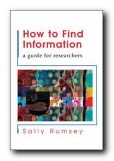
The recent news that Google intends to scan the contents of several research libraries into its database should serve to remind us that not everything is available on the Internet. But good researchers still need to be able to find information from a variety of sources. This book shows you how to do it. Sally Rumsey includes all the most obvious topics concerned with the information gathering process, such as how to use a library, how to identify existing research, and how to use the World Wide Web for locating information.

How to Find Information You would expect that from any serious guide of this kind. But she also includes chapters on aspects of research which many people find baffling. These include actually identifying an information need in the first place; citation searching; locating and evaluating resources; citing references; keeping records; and how to keep up to date with the latest trends.

Everything is tackled in a very thorough and methodical manner. If like me you’re one of those people who learn from seeing, you’ll be glad to know that there are plenty of diagrams, tables, and flow charts to illustrate her suggestions.

So, for instance, the chapter on using a library covers types of libraries, classification systems, and how to search the catalogue using a variety of techniques.

Of course a great deal of attention is devoted to online searching – and quite right too. It includes search terms, Boolean operators [and/or/not] and how to interpret the results.

With the very welcome expansion of online resources however, there is a danger that a lot of people will simply do an Internet search, then give up immediately if they don’t find what they are looking for. Serious researchers need to be more persistent.

In fact all information search skills will need to become more sophisticated as time goes on – but we shouldn’t forget that for the moment the majority of the world’s assembled wisdom resides in the form of what Nicholas Negroponte calls “ink pressed onto dead trees”.

I was glad to see a chapter on plagiarism and copyright – though I think at postgraduate research level the niceties of plagiarism warrant spelling out in a lot more detail.

The audience for this book is quite wide – serious undergraduates, all postgraduates, librarians, researchers, and even tutors who have an interest in keeping up to date with information skills.

It’s written in a friendly and approachable style and laid out in a user-friendly way, and there’s a glossary, a bibliography, an index, and a webliography or whatever we eventually decide to call a list of web addresses.

© Roy Johnson 2008

How to Find Information   Buy the book at Amazon UK

How to Find Information   Buy the book at Amazon US


Sally Rumsey, How to Find Information: a guide for researchers, Maidenhead: Open University Press, 2nd edition, 2008, pp.223, ISBN: 0335226310


More on study skills
More on writing skills
More on online learning


Filed Under: Study skills Tagged With: How to Find Information, Information management, Research, Searching, Study skills

How to Get a Good Degree

July 15, 2009 by Roy Johnson

making the most of your time at university

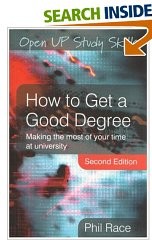
The quick answer to how to get a good degree is of course to graduate with first class honours from a world class university. But such advice is about as reductively simplistic as Paul Getty’s ironic formula for getting rich: “Rise early. Work late. Strike oil.” Obviously there’s a lot more to it than that, and Phil Race’s guidelines are based on the realistic supposition that most students need support and guidance throughout the whole of their three years as an undergraduate. It’s a supposition that is sadly true more than ever in the current academic climate (in the UK at least). Tutors are under government pressure to produce ‘research’ (which few people read) and many of their original teaching commitments have been sub-contracted to part-time teachers and postgraduate students.

How to Get a Good DegreeThe net result is that students need the skills to support themselves through their coursework and assessments. Race starts off by covering issues such as motivation and self-awareness via a series of checklists in which students make a judgement of their current attitudes – with a view to enhancing them to improve their chances. In this way they can come to understand the basic processes of successful learning.

Students are urged to make an audit of their strengths and develop the skills of effective time-management. This is followed by learning to get more out of lectures, plus the significant differences between taking and making notes.

He also covers the skills required to make profitable use of small group tutorials, seminars, field work, laboratory work, and even work-based learning. There’s a whole chapter on learning from feedback on written work, showing students what they can gain in addition to the assessment of quality based on the mark awarded.

Then comes a major section on making the best of ‘learning resources’. These can be anything from lecture handouts, student support services, to the library and making intelligent Internet searches.

But the life of a student isn’t all intellectual work and enquiry. So he also covers personal aspects of student life – such as where to live, how to cope with a part-time job, and how to develop your computer skills.

Finally, though it might well have come first, he deals with the issue of improving your assessed course work. This includes essay writing skills, making presentations, completing projects, and how to do practical work. He tops this off with revision and examination skills, so by the time you come to the end of the book, just about every conceivable aspect of undergraduate life has been covered.

After that, it’s up to any student to apply all this excellent advice. If that’s done as thoroughly as it’s all been explained, the result should be a good degree.

© Roy Johnson 2007

How to Get a Good Degree   Buy the book at Amazon UK

How to Get a Good Degree   Buy the book at Amazon US


Phil Race, How to Get a Good Degree, Open University Press: Maidenhead, 2nd edn, 2007, pp.272, ISBN: 033522265X


More on study skills
More on writing skills
More on online learning


Filed Under: Study skills Tagged With: Education, How to Get a Good Degree, Study skills

How to get a PhD

July 14, 2009 by Roy Johnson

research, writing, and information management skills

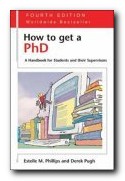
Nothing can quite prepare you for a PhD. It’s likely to be the longest piece of research and writing you ever undertake in your life. How to get a PhD is a guide to the process, and a survival kit for doctoral candidates. The authors are particularly good on the meaning and structure of a PhD, how to develop time management skills, and the difficulties of communicating with supervisors and how to overcome them. Much of this would apply to online PhD students too.

How to get a PhD If you are intending to embark on a research degree it will introduce you to the system and help you to improve your choice of university, college, department, and even supervisor. The first part of the book deals with the process of becoming a postgraduate student, how to get into the academic system at this level, and the special demands and exact nature of the PhD qualification. There is then advice on how to do research and a discussion of the structure required in this form of writing.

Phillips and Pugh then pass on to the substance of the task so far as the candidate is concerned – the long slog through three years of reading, writing, note-taking, and data collection.

They cover the special problems of groups such as women, part-time, and adult students, plus the tricky issues of dealing with supervisors and an environment which is based on the deeply entrenched privileges of old, white, Anglo-Saxon males (some of them already dead).

New for this fourth edition is a diagnostic questionnaire for students to monitor their own progress, plus a new section on the increasingly popular professional doctorates such as EdD, DBA, and DEng.

And then suddenly, and rather strangely (though true to its subtitle) the subject of its address changes from student to tutor. They discuss how supervisors can improve the support they give to students – largely by making the effort to see the process from the student’s point of view.

As a supervisor myself, I found this section instructively chastening. They offer a number of useful suggestions for making feedback more effective, and then end with notes on the responsibilities which institutions have to provide an adequate overall service for research students.

This is a book which is standing the test of time. First published in the 1980s, new material has been added for the latest (fourth) edition, which now includes information technology, publishing your work, and teaching and working towards a PhD in a practice-based discipline. There are very few guides to help people at this level of academic work. Anyone about to embark on the three year odyssey would do well to read this first – then pass it on to your supervisor.

© Roy Johnson 2010

How to get a PhD   Buy the book at Amazon UK

How to get a PhD   Buy the book at Amazon US


Estelle M. Phillips and Derek S.Pugh, How to get a PhD: A handbook for students and their supervisors, Buckinghamshire: Open University Press, 5th edn, 2010, pp.220, ISBN: 0335242022


More on study skills
More on writing skills
More on online learning


Filed Under: Study skills Tagged With: Academic writing, How to get a PhD, PhD, Postgraduate studies, Research, Theses

How to give seminar presentations

September 29, 2009 by Roy Johnson

tips for effective communication skills

1. Seminar presentations are short informal talks giving the results of your researches into a topic on the course. You are sharing your ideas or discoveries in a way that gives seminar participants an opportunity for discussion. These seminar presentations form a normal part of the teaching and learning process in postgraduate studies.

2. The person who will learn most from this exercise is you. The act of investigating sources, digesting information, and summarising other people’s work will help to clarify these matters in your mind.

3. You will also develop your confidence in handling information, making useful notes, and presenting an argument.

4. Unles the topic has been given to you by the course requirements, you can usually choose your own. Select something which reflects your own particular interests. If you are in any doubt, check with your tutor.

5. Topics will vary from one discipline to another. They might be:

  • a ‘reading’ of a set text from the course, applying one critical theory
  • the report of an investigation or an experiment
  • a ‘literature’ review which surveys existing knowledge
  • a response to one of the tutorial topics from the course materials

6. A seminar presentation should not try to imitate an academic essay. It is better to offer a presentation on something smaller and more specific, rather than the type of general question posed in a coursework essay.

7. Don’t write down the presentation verbatim. Make outline notes, then speak to these notes using the set text(s), any critical theory, and your own extended notes as backup material.

8. If you have the resources, it is a nice courtesy to provide other members of the group with a copy of your outline notes.

9. Overhead projection facilities will often be available if you wish to show transparencies. Otherwise, photocopies of any illustrative material will be perfectly acceptable.

10. In more formal, public settings, PowerPoint presentations are now the expected norm – possibly with embedded web links and video clips.

Suggested Headings

The general headings for your notes may vary according to the topic of your choice and the approach you adopt. Here’s an example for a presentation in literary studies at post-graduate level. The following may be used – from which you should be able to see that some form of logical progression is required.

The set text
Explain which edition you are using, and any special considerations. You might indicate which different editions exist, and what led to your choice. In other words, you are explaining your selection of source materials.

The course topic or seminar question
You might say why you have chosen the seminar topic, or why it seems significant. If possible, you should relate it to the other major issues of the course. You are explaining why this issue or topic is worthy of consideration.

The critical theory
Give a brief summary of the origin and principles of any critical theory you will be applying. This will help to ‘situate’ your remarks. This is almost the equivalent of describing the experimental method in a scientific report.

Your own argument
Give a general summary of what you have to say, and its relation to the course as a whole. Make the stages of your argument clear, and indicate the conclusion to which they lead.

Scholarly details
You should provide full bibliographical details of any texts you use during the course of the presentation.

Topics for discussion
A good presentation should lead to questions or further issues raised by the subject of your enquiry. Including these issues as part of your conclusion should lead naturally into a discussion amongst the seminar participants.

© Roy Johnson 2009


Filed Under: Study Skills Tagged With: Education, Presentations, Research, Seminars, Study skills

How to improve your grammar

September 15, 2009 by Roy Johnson

basic guidelines for better writing

The quickest way to improve your grammar is to simplify your writing as much as possible.

Grammar is a combination of a number of different aspects of language

  • sentence construction
  • punctuation
  • spelling and vocabulary
  • agreement and syntax

The best approach is to tackle these issues one at a time.

Don’t try to improve your grammar by memorising rules – because there are many exceptions to most of them.


Sentences

In most writing, all normal sentences should begin with a capital letter and end with a full stop.

A normal sentence in English usually contains at least three elements: a subject, a verb, and an object.

Subject Verb Object
The cat eats the goldfish
My friend is tall
Some sheep are black

If you are in any doubt at all, follow this pattern. Sentences which go out of grammatical control often lack one of these elements, or they have them placed in a different order.

Short, clear, and simple sentences are usually more effective than those which are long and complex. Avoid piling up clause upon clause.

In the majority of cases, you should aim for clarity and simplicity in your written style. If in doubt, remember this rule: Keep it short. Keep it simple.

You should avoid starting sentences with words such as ‘Again’, ‘Although’, ‘But’, ‘And’, ‘Also’, and ‘With’. These words normally belong in the ‘middle’ of a
sentence, not at its beginning. Sentences which start with a conjunction are often left incomplete.

Punctuate your work firmly, making a clear distinction in your writing between marks such as the comma, the semicolon, and the full stop.


Punctuation

The comma [,] is used to show a slight pause in a sentence.

It is also used to separate words, clauses, or phrases.

He will never do it, whatever he says.
She bought some butter, a pint of milk, and some jam.
Cars should turn left here, whilst vans should turn right.

It separates two items when the first is not closely associated with the second:

She is a famous singer, whilst her husband remains unknown.

A very common use for the comma is to separate the items in a list:

The box contained a book, some pencils, and a knife.

The semicolon [ ; ] marks a long pause in a sentence.

It is half way between a comma and a colon.

Semicolons are used between clauses which could stand alone, but which are closely related.

He ran with his shirt over his head; he had forgotten his umbrella once again.
She couldn’t dance in her favourite ballroom; it was being renovated.

Semicolons are also used to punctuate mixed lists in continuous prose writing:

Four objects lay on the desk: a large book; a spiral-bound notepad; a glass vase containing flowers; and a silver propelling pencil.

If you are in any doubt at all concerning the correct use of the semicolon – then avoid using it entirely.

It is perfectly possible to write clearly and effectively using only the
comma and the full stop.

The full stop [.] (sometimes called the period) is a punctuation mark indicating a strong pause.

It is used most commonly at the end of a complete sentence – like this one.

This is a short sentence. This is another.
It happened suddenly in 1996.
There are two reasons for this (in my opinion).

The only common exception to this rule occurs when the sentence is a question or an exclamation.

Is this question really necessary?
What a mess!

Notice that both of these punctuation marks include a full stop.


Spelling

If you are not sure about the correct spelling of a word, look it up in a good dictionary.

The best ways to improve your spelling are:

  • learn commonly mis-spelled words
  • learn the common rules of spelling
  • learn good spelling strategies

The most commonly mis-spelled words are probably there/their, its/it’s, to/too/two, and are/our.

This problem is caused because these words sound the same as each other. Here’s how to tell them apart.

There refers to a place, whereas their means belonging to them.

The table is over there, in the corner [place]
We are going to their house [belonging]

Its means belonging to, whereas It’s is a shortened form of It is.

The dog is in its basket [belonging]
It’s too late now [It is]

To means ‘towards something’, too means ‘very or in addition’, and two is the number 2.

We are going to the concert [towards]
It was too cold for swimming [very cold]
He ate two chocolate bars [number 2]


Agreement and Syntax

There must be grammatical logic or coherence in the links between parts of a sentence.

This is called case agreement.

If the subject of a sentence is singular, then the verb form must be singular as well.

The shop [singular] opens at nine o’clock.
On Thursdays the shops [plural] open late.

Sometimes confusion occurs because a statement begins in the singular but then drifts into the plural

Wrong
It can be argued that a person has the right to know when they are dying.

The easiest solution to this problem is to make the subject plural and its verb plural as well.

Correct
It can be argued that people have the right to know when they are dying.

Syntax is the grammatical arrangement of words in a sentence.

It concerns both word order and agreement in the relationship between words.

The following statements follow normal English word order:

The cat sat on the mat.
My old brown leather suitcase.

The following statements do not follow normal English word order:

The cat on the mat sat.
My brown leather old suitcase.

© Roy Johnson 2004


More on How-To
More on literary studies
More on writing skills


Filed Under: How-to guides, Writing Skills Tagged With: Good English, Grammar, Language, Study skills, Writing skills

  • « Previous Page
  • 1
  • …
  • 39
  • 40
  • 41
  • 42
  • 43
  • …
  • 103
  • Next Page »

Get in touch

info@mantex.co.uk

Content © Mantex 2016
  • About Us
  • Advertising
  • Clients
  • Contact
  • FAQ
  • Links
  • Services
  • Reviews
  • Sitemap
  • T & C’s
  • Testimonials
  • Privacy

Copyright © 2026 · Mantex

Copyright © 2026 · News Pro Theme on Genesis Framework · WordPress · Log in