Mantex

Tutorials, Study Guides & More

  • HOME
  • REVIEWS
  • TUTORIALS
  • HOW-TO
  • CONTACT
>> Home / Archives for 2009

Archives for 2009

Web Essay 8 – definition of terms

November 24, 2009 by Roy Johnson

Student: James Higginson
Course: An Introduction to the Internet


Definitions

WAN
A WAN is a network that covers a large geographical area. Each node in a WAN may be located in a different town. A mainframe or minicomputer will usually be involved somewhere in a WAN.

LAN
A LAN is a network that covers a smaller area than a WAN. Typically a LAN will serve the needs of one institution at one site. For example a university will have their own LAN, as may an individual bank. LANs often connect to other LANs and to WANs to allow communication between them. These interconnected LANs and WANs form a network of networks commonly known as the Internet.

Ethernet
Ethernet is a network protocol for LANs. It operates on a bus network topology. It was developed by Bob Metcalfe at Xerox PARC and is the most popular method of LAN protocol. Its popularity is a result of its reliability, speed and relative cheapness.

Networks
The public telephone network is officially known as the Public Switched Telephone Network (PSTN). While switchboard operators were replaced by mechanical, and later by computerized switching equipment, and optical (glass) fibre has replaced much of the copper wiring, the function of the network is still simply to connect the wires of two telephones (or compatible devices such as fax machines or modems), so that sounds coming from one end are transmitted to the other. This is called a ‘circuit-switched’, or more simply ‘switched’, network architecture.
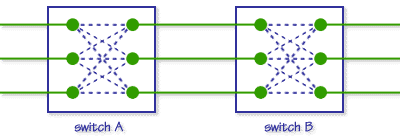
Switching - graphic

Circuit Switching
While this system is very reliable, it is also extremely inefficient and expensive because the connection is made at the beginning of a conversation, fax transmission, or modem ‘session’, and is maintained until the connection is terminated – meaning a certain portion of the network is reserved exclusively for that conversation whether or not communication is taking place at the moment. If one party puts down the phone or is silent, or neither computer is sending or receiving data for a period of time (as is the case when using the Internet), that circuit as well as the ‘ports’ on the phone switches between the two devices are still unavailable for other activity even though they are not being used at the moment. Since it is estimated that up to 50% of a typical voice conversation is actually silence, clearly a tremendous amount of network capacity is wasted. (Put another way: a company must build double the network it really needs for a given number of simultaneous calls at double the cost.)

Packet Switching
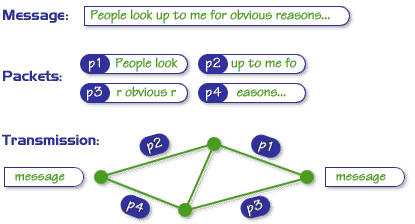
Packet networks break the digital stream of ones and zeros into chunks of the same length. These chunks, or ‘packets’, are then put in the computer equivalent of an envelope, with some information such as the origin and destination, or ‘addresses’, of the packet, and a serial number that indicates the sequence number of the packet – its ‘place in line’. In the place of switches which merely connect and disconnect circuits, packet networks use routers – computers that read the address of a packet and pass it to another router closer to the destination. At the destination, a few thousandths of a second later, the packets are received, reassembled in the correct order, and converted back into the original message. Here is an illustration of how it works:
Packet-switching - graphic

Packet Switching – How it works
The routers in a packet-switched network are permanently connected via high-speed lines. This may seem expensive at first sight, but it makes sense economically (and technically) if the network is heavily used, i.e. effectively flooded with packets.

TCP/IP
The Internet works by breaking long messages into smaller chunks called packets which can then be switched through routers until they reach their destinations. The software associated with the TCP/IP family of protocols takes care of the assembly, disassembly and addressing of packets.
Packet anatomy - graphic

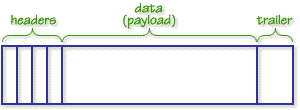
Anatomy of a Packet

Essentially, a packet is a string of bits divided into different segments. At its core is a Data segment (the chunk of the original message) which is sometimes referred to as the payload. In order to arrange for the passage of the payload through the Internet, extra information is added to it in the form of headers or (occasionally) trailers

TCP was eventually split into two protocols – one (IP) to handle addressing of packets, the other (TCP) to deal with their assembly and disassembly. The design philosophy behind this was the belief that it was better to have specialised protocols which each did one job and co-operated with one another rather than trying to design one, all-embracing monolithic protocol which tried to do everything.

DNS
The Domain name system (DNS) is the way that internet domain names are
located and translated into Internet Protocol addressess. A domain name is a
meangingful and easy-to-remember “handle” for an internet address.

POP3
POP3 (Post Office Protocol 3) is the most recent version of a standard protocol for receiving e-mail. POP3 is a client/server protocol in which e-mail is received and held for you by your Internet server. Periodically, you (or your client e-mail receiver) check your mail-box on the server and download any mail. POP3 is built into the Netmanage suite of Internet products and one of the most popular e-mail products, Eudora. It’s also built into the Netscape and Microsoft Internet Explorer browsers.

IMAP
IMAP (Internet Message Access Protocol) is a standard protocol for accessing e-mail from your local server. IMAP (the latest version is IMAP4) is a client/server protocol in which e-mail is received and held for you by your Internet server. You (or your e-mail client) can view just the heading and the sender of the letter and then decide whether to download the mail. You can also create and manipulate folders or mailboxes on the server, delete messages, or search for certain parts or an entire note. IMAP requires continual access to the server during the time that you are working with your mail.

SMTP
SMTP (Simple Mail Transfer Protocol) is a TCP/IP protocol used in sending and receiving e-mail. However, since it’s limited in its ability to queue messages at the receiving end, it’s usually used with one of two other protocols, POP3 or Internet Message Access Protocol, that let the user save messages in a server mailbox and download them periodically from the server. In other words, users typically use a program that uses SMTP for sending e-mail and either POP3 or IMAP for receiving messages that have been received for them
at their local server.

HTTP
The Hypertext Transfer Protocol (HTTP) is the set of rules for exchanging files (text, graphic images, sound, video, and other multimedia files) on the World Wide Web. Relative to the TCP/IP suite of protocol, HTTP is an application protocol. Essential concepts that are part of HTTP include (as its name implies) the idea that files can contain references to other files whose selection will elicit additional transfer requests.

HTML
HTML (Hypertext Markup Language) is the set of “markup” symbols or codes inserted in a file intended for display on a World Wide Web browser. The markup tells the Web browser how to display a Web page’s words and images for the user.

XML
XML (Extensible Markup Language) is a flexible way to create common information formats and share both the format and the data on the World Wide Web, intranets, and elsewhere. For example, computer makers might agree on a standard or common way to describe the information about a computer product (processor speed, memory size, and so forth) and then describe the product information format with XML. Such a standard way of describing data would enable a user to send an intelligent agent (a program) to each computer maker’s Web site, gather data, and then make a valid comparison. XML can be used by any individual or group of individuals or companies that wants to share information in a consistent way.


Home
Introduction – What is the Internet? – Internet evolution – Father of the Internet
Assignment resources – Essay plan – Definition of terms – Tutor comment
 

Copyright © James Higginson 2000

Filed Under: How-to guides, Study Skills Tagged With: Internet history, Study skills, Technology, Web essay, Writing skills

Web Essay 9 – tutor comment

November 25, 2009 by Roy Johnson

Student: James Higginson
Course: An Introduction to the Internet


Congratulations on your essay James. It’s a substantial piece of work, and you have done well. I realise that the last few weeks on the course have been tough – and it’s to your credit that you’ve stuck at it.

These are my comments, made as I go through the script. Please bear with me, because I am trying to use the marking software, which is a bit temperamental.

&& – indicates where marks have been gained

** – indicates where marks have been lost

Try to avoid posing your argument in the form of questions. Even if they are answered, they usually have the effect of leading away from the question which has been asked.

Very good that you give full references to all your sources. &&

I liked the definitions of LAN and WAN which you put in as links [which worked well]. This shows your exploiting the potential of HTML. &&

[This is a very small detail] I think the references to your sources might look better as footnotes [with links]. This would leave the web essay itself less ‘cluttered’.

I also liked the fact that you made a well-reasoned attempt to ‘answer the question’ [though I was a little surprised that Donald Davies didn’t get a mention].

Your report/essay is thorough, well-executed, and effective. All the links work, and I liked the way you used the horizontal rule to emphasise the structure.

Your plan is good and shows your clear-thinking skills – &&

Your writing is clear, to-the-point, and ‘objective’ – in just the way which is required for academic work. &&

I am also giving you maximum bonus marks for having emailed Vint Cerf. Even though his reply was too late to go into the web essay, I have seen it in the conference, and I think it is in the spirit of the web that you could add it to your assignment.

You have now completed four essays – which means that there’s only the End of Course Assignment to go. You are heading towards successful completion of the course!


Home
Introduction – What is the Internet? – Internet evolution – Father of the Internet
Assignment resources – Essay plan – Definition of terms – Tutor comment


Copyright © James Higginson 2000


Filed Under: How-to guides, Study Skills Tagged With: Internet history, Study skills, Technology, Web essay, Writing skills

Web Navigation

June 18, 2009 by Roy Johnson

navigation, structure, and usability for web design

Web sites have sometimes been described in terms of ‘generations’. David Siegel for instance describes how first generation sites were rapidly thrown together with no greater ambition than to get pages of HTML code onto the Web. The second generation added graphics, started to be concerned with page layout [even though HTML code is not designed for that purpose] and often added eye-popping special effects. Third generation sites have brought some of these excesses under control, and are designed to make the user experience more meaningful. Web Navigation is emphatically third generation.

Web NavigationThere’s no doubt that clever designers have managed to produce some visually stunning Web pages – but many information architects are now beginning to ask questions such as “Can visitors find their way around the site?” and “Is this site achieving its purpose?” The eye candy effects of flashy graphics often mask a lack of content and an incoherent maze of links which visitors are glad to leave quickly via the nearest exit. Jennifer Fleming’s Web Navigation is a serious and articulate plea for intelligent Web site design, and it is based on principles which owe more to information theory and coherent structure than to the luminous-glamour school of graphics-based design.

Like most good designers, she insists on a user-centred rather than client-centred approach to web design. What’s the difference? you might ask. Well, intelligent designers are now beginning to realise that web sites are often created to impress the commissioning clients, rather than the people who will be using them. Men in suits will applaud spiffy graphics when a new site is revealed at a presentation – but they will probably never need to log on again.

The book’s structure reflects the clarity of her purpose. There are six chapters on the foundations of navigation design, then in the second part an analysis of successful sites. There are four appendices: technical tips, a glossary of navigational terms, a list of web resources, and a bibliography. The accompanying CD comes with trial versions of software (including the highly praised Dreamweaver) and it has a marvellous ‘netography’ with listings of articles, web sites, and online resources covering navigation, usability and testing, organisation of information, information design, document markup and scripting. [I loaded the disk, browsed the sites she recommends, and all the links were working.]

Her advice is to provide clear, simple, and consistent navigational aids – and she offers a particularly strong warning against using metaphors such as the office or the supermarket [though curiously, the CD uses icons]. Navigation that works should:

  • be easily learned
  • remain consistent
  • provide feedback
  • appear in context
  • offer alternatives
  • be economic in action and time
  • provide clear visual messages
  • use clear understandable labels
  • be appropriate to site’s purpose
  • support user’s goals and behaviour

Now that’s an important free lesson for you! She is in favour of any interactivity, such as rollovers (‘OnMouseOver’) which provide feedback, and is sceptical of the ‘Back’ button on the grounds that users might enter a site at any page. Where would they be going ‘back’ to? She also raises other interesting navigational questions, such as ‘where will you be when you’ve finished reading a page, and where will you wish or need to go?’

She recommends multiple navigational routes and aids, plus guidance. For instance, a site might have a framed and ‘no-frames’ version, a graphics and no graphics version. It will certainly have navigation hot spots at the top and bottom of every page, maybe a contents list in left-hand frame, plus icons, labels, and anything else which helps users find their way around.

One of the interesting features of her approach is that she illustrates her argument with detailed reference to the work of other ‘information architects’ such as Jakob Nielsen, Clement Mok, Edward Tufte, and David Siegel. The reader is thereby presented with a range of approaches to this relatively new subject. There are lots of bibliographic suggestions and URLs in side-bars on the page – and those I checked were all up-to-date, which is an important feature in such a fast-changing medium.

It’s a book aimed at professionals. For instance, her descriptions of the site design process assume that there will be teams of designers in sessions at a corporate level using flipcharts, video recordings, and even team-working software. There’s lots on brainstorming and chunking in what are now called ‘focus groups’. But these principles could be followed by what I suspect is more likely to be the average reader – somebody working in a spare room at home.

This is a book for people who want to take web design seriously. It’s significant that she spends so much time discussing the thoughtful planning, research, and testing of a site, rather than the creation of flashy effects and animated gimmicks which adorn so many KEWL sites. She has powerful and revealing arguments in favour of a consistent design process (so that the arbitrary element of success or failure can be removed). This is fairly obvious when you think about it – but that’s true of many good ideas.

She includes a full account of professional designers at work, with pointers to the resources they use – such as David Siegel’s free downloadable ‘profiling’ materials at www.secretsites.com for instance.

This is the business studies version of web design manuals, packed with thought-provoking information on determining user goals and expectations. She describes the use of personal interviews, people ‘shadowing’ users throughout the working day, and ‘disposable camera studies’ where users record what they find interesting. Not many individuals will have the resources to be so thorough, and sometimes the ‘feedback-usability-testing’ approach makes this all seem like a science rather than the sales-pitch that it is – as if we can predict how many people will come to our site to buy widgets.

In the second half of the book her notions are put to work analysing the navigational methods and structure at sites built for shopping, entertainment, learning, and community services. This struck me as slightly less interesting than the first part, but still worth reading for the revealing tips and guidance notes embedded in her analysis. The observations, as before, are that successful sites are customer-oriented, and that they give extra consideration to online customers because they lack the navigational support provided during comparable user experiences in libraries, airports and shopping malls.

If there is a weakness in her examinations, it’s that these are often not much more than descriptions of sites – though they are nevertheless well-illustrated mini-lectures, with plenty of screen captures. For instance, she heaps praise on Amazon.com for their search facility and one-click ordering system. However, this doesn’t take into account that the company, despite its multi-million dollar turnover, hasn’t actually made a profit so far.

It’s worth noting that a lot of what she says about helping users through the layers of a site is based on the US-centred assumption that people are going to spend a lot of time browsing – because they have free local telephone calls. But European (certainly UK) users will not have such luxuries. They’ll hit a site, search for what they’re looking for, then disconnect quickly. This economically-driven difference in user behaviour should be taken into account by anyone theorising about navigation, browsing, and web design.

But there are many good tips offered en passant – including some which might seem obvious, but which are often ignored by site designers. For instance, I’ve noticed that in the UK, quangos and government departments are very often reluctant to display their postal address [possibly reflecting the arrogant nature of these organisations].
But she insists that

Making your street address, phone number, and email address easily available is not only about completing an online sales pitch…It’s about other elusive qualities: trust and community.

Similarly, many UK universities would do well to heed her advice on making themselves more accessible and well-presented. How many times have you visited a university site and found no lists of courses on offer or staff who teach them? She points to the short-sightedness of this approach:

A large percentage of visitors to a university site are applicants for admission, or are thinking of becoming applicants…If a university can answer their questions fairly easily, it bodes well for the entire process. A positive experience on the Web – especially for college applicants, who tend to make decisions on gut feelings – is a powerful factor in decision-making.

It’s good that she chooses different (and challenging) types of sites to analyse. Searching for information is quite a different matter to being entertained or pushing round a virtual shopping trolley. The section on information sites [Lycos, Computers.com] is particularly interesting, because she forces us to think about different types of questions which might be asked of a site, and the different approaches to searching users develop.

Until recently, just providing information via the Web was a laudable pursuit. It was enough to be one of the forward-thinking few who recognised the power of the Web for mass communication. Those days are gone, replaced with a new challenge: providing increasingly complex layers of information, and making it all seem simple.

Very near the end of the book she presents a simple formula for successful sites. Aspirant site designers would do themselves a favour by writing her tips on Post-It notes and sticking them on their monitors:

  • keep every page below 20K
  • recycle headers
  • keep graphics small and simple

Jennifer Fleming has a background in library and information science, and her advice and observations strike me as more seriously well-founded than most of the web design manuals I have ever seen. This is a wonderfully rich and thought-provoking study which anybody analysing or building web sites should put on their list of essential reading.

© Roy Johnson 2000

Web Navigation   Buy the book at Amazon UK

Web Navigation   Buy the book at Amazon US


Jennifer Fleming, Web Navigation: Designing the User Experience, Sebastopol: O’Reilly, 1998, pp.253 plus CD-ROM, ISBN: 1565923510


More on information design
More on design
More on media
More on web design


Filed Under: Information Design, Web design Tagged With: Experience design, Information architecture, Information design, Navigation, Usability, Web design, Web Navigation

Web Pages that Suck

June 18, 2009 by Roy Johnson

principles of good design – shown by critiques of bad sites

This is a web design guide with a twist: it teaches by negative example. Yet it works – and has become a best-seller. The subtitle tells all: ‘Learn good design by looking at bad design’. The idea of learning how to make a nice website by looking at naff aspects of existing websites, and avoiding their sucky techniques, is a good one. The book is fun to read, but you get a lot out of it too. Flanders and Willis have no wish to impress you with their understanding of difficult, techie aspects of web design. Their line is that you should avoid getting carried away and keep things simple

Web Pages that SuckThis book shows that you can start a website yourself and watch it grow into a big and successful thing – because that’s exactly how Web Pages That Suck came to be a best-selling book. It’s based on a website made by Vincent Flanders that got listed as a Yahoo! Pick of the Week and became very popular. For that reason, it’s very well illustrated – and the idea of critical analysis of bad examples is one which has also been proved to be effective by Web guru Jakob Nielsen in his recent Designing Web Usability.

But be warned – it doesn’t set out to teach you HTML from scratch, if that’s what you want. It comes with a free CD full of useful things – but then so do lots of magazines. You also have to put up with lots of photos of the authors in ‘comic’ poses. But as writers, they are what the cover says: ‘Funny, opinionated, and always to-the-point [with] a reputation for being the Web’s leading critics’.

© David Gauntlett 2000

Buy the book at Amazon UK

Buy the book at Amazon US


Vincent Flanders and Michael Willis, Web Pages That Suck, San Francisco (CA): Sybex International, 1998, pp.384, ISBN 078212187X


More on web design
More on digital media
More on technology


Filed Under: Web design Tagged With: Graphic design, HTML, Web design, Web Pages that Suck

Web ReDesign: Workflow that Works

June 19, 2009 by Roy Johnson

managing large scale web site makeovers

This is a book about managing Web re-design projects – but in fact the general principles could be applied to any large project. And the details could be applied to any first time Web design. The authors make it clear that they are not offering a Web design manual. It’s about project management. But the issues of what makes an efficient site can’t help keep cropping up again and again in the advice they offer. The main import of their strategy is to suggest timelines, planning schedules, and checklists for project teams involved in big site re-designs.

Web ReDesign: Workflow that WorksIt’s all fairly logical and obvious when you see it written down, but of course many businesses don’t work in this manner. There’s a relentlessly detailed approach to identifying and documenting every smallest feature of the client’s business and requirements. The problem with this approach is that it would cost an enormous amount in person-hours just to gather the information, irrespective of how useful it proved to be. I wonder how many consultancies could afford to factor in such workloads without fear of pricing themselves out of the contract.

The book is packed with worksheets and checklists, most of which are downloadable from the book’s own Web site. They even show examples of how to set charges and create a commercial agreement. There are useful definitions of the roles undertaken by various members of a project team – from the manager to designers and ‘backend engineers’.

There’s a good chapter on designing the structure of a site, naming its parts, and labelling its contents. They also deal with colour as a navigational and design aid, then finish with advice on preparing for and delivering a site launch, before maintaining it.

Almost every page has a screen shot or a diagram, and there are plenty of pullout boxes with tips and advice on everything from style sheets and file sizes, to testing, upgrading, and evaluation. It’s a bit like looking at a Web site in print form.

Two of the nicest features of the book are that their chapters and interspersed with examples of site makeovers, and there are mini essays from design and usability gurus every few pages. These make excellent reading.

This is all very thorough, and it will be of most use to designers and consultants working on big sites – but many of the detailed points of advice will be just as useful to serious small and home-based site designers.

© Roy Johnson 2003

Buy the book at Amazon UK

Buy the book at Amazon US


Kelly Goto and Emily Cotler, Web ReDesign: Workflow that Works, Indianapolis (IN): New Riders, 2002, pp.253, ISBN 0735710627


More on web design
More on digital media
More on technology


Filed Under: Web design Tagged With: Information design, Project management, Web design, Web ReDesign: Workflow that Works

Web Site Design is Communication Design

June 19, 2009 by Roy Johnson

“This book is not a book about web technology … [it’s] about the design of web sites, studied as a communication process” Thea van der Geest makes it plain from the start that her approach is focussed on information architecture and communication design issues. In fact her work is an academic summary of ten case studies based in the Washington area of the US – an interesting mix of public services, local government, and state transport – as well as local web giants such as Amazon and Microsoft (who she refers to as ‘the Internet Bookstore’ and ‘The Software Corporation’).

Web Site Design is Communication Design What the reports offer is first-hand accounts from the designers of these sites, indicating the development of their policies, strategies, and techniques. After a couple of ground-clearing chapters dealing with the advantages of using the Web as a communications medium, she gets down to the heart of the book. This is a detailed breakdown of the stages of the design process – from the original conception of a web site, through to testing, revision, and maintenance. Here there is a wealth of information for information architects, web designers, project managers, and anybody else who needs an organisational overview of the design process.

She points to the unpredictable effects which the establishment of a web site can have on individuals and organisations – changes to job descriptions, increased costs, shifts in policy, the sudden need for response to new customers.

The last part of the book is concerned with evaluating web site effectiveness by analysing log files and the information from cookies. There is not much detailed technical information here: she is more concerned with larger strategic issues – such as the fact that once data on user profiles reaches a certain size, it becomes part of marketing strategy. She also discusses the problems of dealing with email feedback, focus groups, and questionnaires.

The final chapter is a series of checklists which are process-oriented. They cover all the stages of web design. They assume a large-scale organisation, with lots of personnel resources, but the principles she illustrates will be of use to anybody who wants to make a web site efficient and maybe even profitable.

This study is mainly aimed at communications professionals. It’s a web design manual without a single line of HTML code, but it should be on the reading list for anyone involved in a serious web project.

© Roy Johnson 2001

Web Site Design   Buy the book at Amazon UK

Web Site Design   Buy the book at Amazon US


Thea M. van der Geest, Web Site Design is Communication Design, Amsterdam: John Benjamins, 2001, pp.165, ISBN: 9027232024


More on information design
More on design
More on media
More on web design


Filed Under: Information Design, Web design Tagged With: Communication, Information design, Web design

Web Site Marketing Makeover

July 25, 2009 by Roy Johnson

how to make your Web site more usable – on a budget

Marcia Yudkin is offering here the sort of tips on Web site ‘usability’ made famous by Jakob Nielsen – but she does it in a gentler and less challenging manner. Few of the suggestions she makes in Web Site Marketing Makeover require any expenditure – just energy and intelligence. This is the latest title from TopFloor Publishing – who specialise in books which offer geek-free, common sense advice to people working on a budget. It will be ideal for people who want to improve an existing web site – and for those designing one who want to make it effective.

Web Site Marketing Makeover She goes into the fine details of Web enterprise – starting from such fundamental issues as the name of the site, the appearance of the home page, and the number and size of the items on it. All her suggestions are designed to promote maximum usability and user-oriented design. She is a supporter of the approach taken by Nielsen, Edward Tufte, and Steve Krug. She describes how to create useful navigational links: how to name them, group them logically, and display them in a way which will attract users without making the page ugly.

There’s an interesting chapter on how to create the writing which is going to do the bulk of the work of conveying what you have on offer to your visitors. Yudkin is drawing on her experience as an advisor to a wide variety of businesses, and the examples she cites range from non-profit-making organisations, individual entrepreneurs and consultants, to big organisations such as finance companies and e-commerce giants.

Almost every page carries screenshots showing negative as well as positive examples to illustrate the advice she offers – and she is brave enough to talk you through her own makeovers of commercial sites.

For those interested in hard e-commerce, there is plenty on forms, subscription systems, payments, and how to build the confidence and trust of the customer. But typical readers are likely to be those working to a budget – and they will appreciate her pointers towards free resources in every section. These really are impressive in their range – free content, software, services, graphics, fonts, advice – even free e-commerce shopping trolleys.

This is another excellent addition to TopFloor’s Poor Richard series – worth it alone for the superb annotated listing of recommended books and Web resources.

© Roy Johnson 2002

Web Site Marketing   Buy the book at Amazon UK

Web Site Marketing   Buy the book at Amazon US


Marcia Yudkin, Poor Richard’s Web Site Marketing Makeover, Lakewood CO: TopFloor Publishing, 2001, pp.249, ISBN: 1930082169


More on eCommerce
More on media
More on publishing
More on technology


Filed Under: e-Commerce Tagged With: e-Commerce, Marketing, Online selling, Technology, Web design, Web Site Marketing Makeover

Web Site Measurement Hacks

July 14, 2009 by Roy Johnson

tips and tools to help optimise your online business

If you take a serious interest in your web site, once you’ve got over the obsession with how it looks, you’ll want to know how it performs. And if it includes any element of e-commerce, you’ll undoubtedly want to know how to improve that performance. Eric Peterson’s guide Web Site Measurement Hacks is a technical guide to doing that by measuring what is going on – and that means hard figures, the number of visitors you get, and what they do when they arrive at your site.

Web Site Measurement HacksThe first and most important thing is to know the definition of terms in this arcane world – to know the difference between ‘hits’, ‘visitors’, and ‘unique page views’ for instance. He explains these issues really well, and emphasises that you need to understand the technical details if you want to increase your site traffic. Although some of his suggestions are aimed at businesses with big money to spend on web site optimisation, I was glad to see that he included the cheap and even free options available for small and start-up entrepreneurs. This includes programs such as Analog, which I have used myself in the past.

He explains how to understand and analyse web logfiles, and how to get a more accurate picture of which human beings are visiting your site by excluding from the results robot searches and other data which has been pulled from cache. For those who are really technologically ambitious, there are instructions on how to build your own web measurement application, along with the necessary core code and the location of free downloadable add-ons.

As the book progresses it becomes more technical. First he deals with JavaScript page tags, then how to use one-pixel hidden graphic ‘bugs’ to learn more about what visitors do on your site. He also covers learning from errors – that is, understanding (and rectifying) the broken links and the pages which are not delivered on request to your visitors.

After that, he switches to explaining the details of online marketing. This involves a close examination of terms such as ‘click through rate’ and ‘cost per conversion’, as well as how to measure the effectiveness of banner advertising.

Most of his recommendations are sound. On the optimization of web page size he mentions the free service offered by Andy King (author of Speed Up Your Site). I ran a few pages from the site you are visiting now through his analyzer and learned a lot about possible improvements.

The later stages of usability become more and more complex. The hacks he discusses here are for people with serious e-commerce ambition who are prepared to spend time and money on making their site(s) more effective. They include features such as measuring the demographics of your site visitors, analysing their behaviour patterns, and gathering data on their engagement with the retail process.

This is a book which deals with both the technical issues of maintaining your Web’s infrastructure and the business implications of interpreting the data it generates. It’s a technology companion that any serious web entrepreneur will welcome.

© Roy Johnson 2005

Web Site Measurement   Buy the book at Amazon UK

Web Site Measurement   Buy the book at Amazon US


Eric T. Peterson, Web Site Measurement Hacks, Sebastopol, CA: O’Reilly, 2005, pp.405, ISBN: 0596009887


More on eCommerce
More on media
More on publishing
More on technology


Filed Under: e-Commerce, Web design Tagged With: Computers, Optimization, Technology, Web design, Web Site Measurement Hacks

Web Style Guide

July 5, 2009 by Roy Johnson

principles of good design, navigation, and usability

This is a guide to Web site design, not to HTML coding. In fact, it will be entirely suitable for someone who has a basic grasp of HTML, but who wants to learn about the strategic issues of how to communicate via this amazingly cheap and democratic medium. The Web Style Guide began its life as advice to users at the Centre for Advanced Instructional Media at Yale University. Lynch and Horton start out with basic design concepts and information architecture, and wisely advise following the principles of good navigation which arise out of centuries of print culture – whilst making plenty of subtle distinctions between different applications and user groups, such as web sites for training, teaching, and reference.

Web Style GuideThey deal with issues of page length, typography, information chunking, and the use of frames; and they spell out the advantages of cascading style sheets. There is even a chapter on editorial style – on how to write most effectively for Web pages: summary first, short sentences, and chunked information. They go into a lot of detail on graphics and multi-media, and they end up with really useful tips on animation, audio, and compression.

Even though they take a ‘No HTML’ approach, it might have been useful to show how some of the effects can be created. On the control of vertical and horizontal white space on the page, they are fans of the David Siegel one-pixel spacer trick, where a small graphic spacer is stretched out to create indents, half line spacing, and even empty vertical columns. It’s a shame that Yale University Press has not decided to do justice to the original of this publication by reproducing some of the pages in colour. The section on graphics for instance is undermined by grey-toned pictures.

There is a consistent stress on user-friendliness and web-centred design, and their advice comes in the form of compressed wisdoms which suggest they’re based on a lot of experience. The style is wonderfully concise: almost every sentence is a well-crafted digest of advice.

Hypertext links pose two fundamental design problems. They disrupt the flow of content in your site by inviting the reader to leave your site. They can also radically alter the context of information by dumping the reader into unfamiliar territory without preambles or explanation.”

I first read most of this book by downloading PDF files from their website. At that time the text actually looked more attractive on screen than it did in print. However, this has been rectified in the latest edition. This is now a very attractive book, and an excellent publication which combines the basic principles of information architecture with well-informed tips on website design.

© Roy Johnson 2002

Buy the book at Amazon UK

Buy the book at Amazon US


Patrick J. Lynch and Sarah Horton, Web Style Guide: Basic Design Principles for Creating Web Sites, New Haven: Yale University Press, second edition 2002, pp.164, ISBN 0300088981


More on web design
More on digital media
More on technology


Filed Under: Web design Tagged With: Information architecture, Information design, Navigation, Web design, Web Style Guide

Web Type: Start Here

May 21, 2009 by Roy Johnson

from typographic zero to hero in easy lessons

This is a very stylish production giving an overview of Web type. Every double-page spread has been carefully planned and laid out. It’s a book which follows the same principles of good design it espouses. Tom Arah starts with a crash course in the history and principles of typography, then quickly accelerates into the computer age, covering screen-readable fonts, and typeface conventions. Each page is as deeply layered as its possible to be in two dimensions, and every topic is illustrated with several graphic examples and screenshots. It’s a delightful book to browse as well as to read in depth. It’s a great introduction to the subject.

Web Type: Start HereThere’s a very user-friendly introduction to HTML, with a quick-start tutorial on how to control layout, colour, space, and fonts. All this is designed to create more visually interesting Web pages. Next comes the introduction of graphic images, displaying fonts correctly, and making them look as attractive and efficient as possible. It’s all done via a series of thirty-three practical projects. These take you through the skills required to control type and layout on screen

He shows you how to use style sheets, and there’s even advanced stuff on the type-handling abilities of Macromedia Flash and Adobe Acrobat. There’s a beginner’s introduction to Flash which I found useful as someone who wants to know the basic principles. He even shows you how to do Flash tricks using free software – so you don’t have to buy expensive programs.

If you are frustrated by the limitation of font control in HTML – and who isn’t! – you’ll be glad to read his explanation of font embedding – which rightly describes as “the Web’s best-kept secret”.

This is followed by a careful tutorial on using cascading style sheets, which he takes one step at a time, explaining not only type control but page layout and the control of all design elements. Web browsers are still catching up with these possibilities – but he takes a look ahead to CSS 3, which with luck will create a common set of standards.

I looked at a couple of other manuals whilst reading this, and was amazed at how old-fashioned they suddenly appeared. Books like this are setting new standards for presentation and production values.

© Roy Johnson 2004

Buy the book at Amazon UK

Buy the book at Amazon US


Tom Arah, Web Type: Start Here!, Lewes: ILEX, 2004, pp.192, ISBN: 1904705189


More on typography
More on technology
More on digital media


Filed Under: Typography, Web design Tagged With: Technology, Typography, Web design, web fonts, Web Type

  • « Previous Page
  • 1
  • …
  • 95
  • 96
  • 97
  • 98
  • 99
  • …
  • 103
  • Next Page »

Get in touch

info@mantex.co.uk

Content © Mantex 2016
  • About Us
  • Advertising
  • Clients
  • Contact
  • FAQ
  • Links
  • Services
  • Reviews
  • Sitemap
  • T & C’s
  • Testimonials
  • Privacy

Copyright © 2026 · Mantex

Copyright © 2026 · News Pro Theme on Genesis Framework · WordPress · Log in