Mantex

Tutorials, Study Guides & More

  • HOME
  • REVIEWS
  • TUTORIALS
  • HOW-TO
  • CONTACT
>> Home / Archives for 2009

Archives for 2009

InteractiveDesign2

July 14, 2009 by Roy Johnson

interactive web site pages sample book

This is a stylish – nay, glamorous portfolio of Web page design. InteractiveDesign2 collects the best in graphic creativity from interactive environments generated over the past two years. Two hundred illustrations are featured, including color reproductions of websites, CDROMs, kiosks, and other interactive media. The companies featured include big corporations such as Coca-Cola and Mercedes Benz, National Geographic magazine, film studios, plus IBM, Sony, and Adobe. The majority are saturated with art work and heavy graphic design. But the odd thing is that they are imitating magazine advertising and the cinema screen, rather than maximising the essence of the Web page.

web page designMost of these sites look very attractive printed out on the page – but they take an age to download. The level of interactivity varies. A lot of the sites, when I visited them, have homepages announcing that you need Shockwave and a Flash plug-in just to view what’s beyond the entry screen. These are obviously not businesses who want to make things easy to attract lots of visitors or clients.

Some crashed the browser, whilst others such as Gucci and San Francisco Museum of Modern Art – a rare case where horizontal scrolling seems to work – worked seamlessly, making a very stylish presentation.

Amazingly, none of the sites is credited with a URL. If you want to see the site live in action, you need to work out an address from the title bar or you could make a guess from the name.

There is no commentary or analysis. Designers are listed in an appendix, but it’s a bit of a fag matching names to their work, and there is no informative backup to any of this. You simply have the graphic images to inspect, plus some skimpy designer credits.

You’ll get lots of graphic design stimulation just from looking at the pages of the book. But for fuller value, you’ll need to work out those URLs and look at some of the stunning effects created on screen.

© Roy Johnson 2005

Buy the book at Amazon UK

Buy the book at Amazon US


B. Martin Pedersen (ed) InteractiveDesign2, New York; Graphis, nd, pp.256, ISBN: 1888001925


More on web design
More on digital media
More on technology

Filed Under: Web design Tagged With: Design, Graphic design, Interactive Design, Web design

Internet Annoyances

June 20, 2009 by Roy Johnson

how to fix the most annoying things about going online

Everybody I know has problems with the Internet – and that includes professional writers and web developers. Preston Gralla has problems too: he’s the author of this book of fixes and solutions, and he’s been on line since the mid 1980s. What he offers are tips and reassurance which will help you out of the most common problems. He takes the clever approach of assuming that you are familiar with the basics of computing and goes straight to the problems which bug us all most frequently.

Internet Annoyances How to stop spam; how to get home networks to work; how to kill viruses. And it’s not all negative. There are plenty of tips on downloading free software to help you organise multiple email accounts, index your email, and solve connection problems. I particularly liked his ultra-direct approach. He simply names the annoyance in one paragraph, then goes straight to the fix which will cure it. There’s no excess fat here at all.

There’s plenty on home networking and wireless network annoyances. I’ve never heard of anyone yet who has managed to get set up in this respect without trouble. All his solutions are quick, simple, and clearly explained. If extra software is needed, he nearly always has an option for free downloads.

He has solutions for keeping up fast and efficient connections even when you are sharing networks with bandwidth hogging music downloaders and game-playing kids.

His scope covers all sorts of online and communications technology. How to send email to a mobile phone, for instance; how to do web-based price comparisons using a mobile; and how to get your mobile and laptop to talk to each other.

If you fancy setting up on the web or starting to blog, he gets straight to the issues you will need help with – from simple setup through to uploading pictures from your mobile phone directly onto your blog.

There are lots of really useful and sensible tips – such as how to customise toolbars, how to print just the text from a web page, how to access all the advantages of Firefox (that’s the free alternative to Internet Explorer) and how to customise the cookies your system accepts and rejects.

There are some suggestions I could hardly wait to try out. Free software which will search using all the search engines at the same time – and present the results in related categories. How to find all the hidden goodies in Google – such as searching and reporting back in foreign languages, plus finding news and pictures.

How about this. You can search the web and Amazon at the same time, so that in the results you see books related to the search topic. Neat idea, eh?

There’s also where you can get a free online security check; how to discover the true address of spoofed emails and web sites; plus how to protect yourself in the complex and murky world of online shopping and auctions, and how to find bargains on eBay by using cute tricks such as checking for mis-spelt terms (as in ‘Digital Camaras’)

The internal layout and design of this book is as graceful as all other O’Reilly publications. The jacket cover is awful: just disregard it. I predict this book will do well.

© Roy Johnson 2005

Buy the book at Amazon UK

Buy the book at Amazon US


Preston Gralla, Internet Annoyances, Sebastopol: CA, O’Reilly, 2005, pp.239, ISBN 0596007353


More on technology
More on digital media
More on online learning
More on computers


Filed Under: Computers Tagged With: Computers, Internet Annoyances, Technology

Internet Art

June 25, 2009 by Roy Johnson

modern art meets digital technology – the latest results

As bandwidth has increased and rates for subscribing to it have dropped, so we have easier access to sites offering high quality graphics, animations, and even streamed videos. Digital artists can now make their work available to a very wide audience. This survey of contemporary internet art attempts to merge visual art with the digital world. It comes from the cheap-and-cheerful but excellent value ‘World of Art’ series of paperbacks from Thames and Hudson. As somebody who has recently started to experiment with Internet art – albeit in a Blogging sort of way – I bought this book thinking it would give me some new ideas. It did – but it’s a lot more besides.

Internet ArtIt starts off quite usefully with a quick overview of computers and the Internet, then situates the origins of Net art in the experimental art of the 1960s and 1970s. I was surprised Rachel Greene didn’t have examples from these early years. For instance, it’s half way through the book before she even mentions ASCII art.

Instead, she pitches straight into Web-based ‘happenings’ from the 1990s, where web sites are used to co-ordinate and publicise public events – usually of a ‘situationist’ type. The most interesting innovation which I had not seen before is ‘Browser Art’- where browsers are re-programmed using JavaScript and Perl scripts to simultaneously display a mosaic of materials from multiple sources. The other genre which seems promising is software art.

She is very well informed about what is going on in what I suppose still calls itself the avant-gard, so it’s all the more disappointing that her expression of it is clouded by the written style of the art school manifesto:

As site-specific sculpture operates vis-a-vis the particular components and ideologies of a place, so do many works of Internet art derive in significant ways from their location within a networked public field of vision and consumption.

Fortunately, the book is profusely illustrated, which helps you through two hundred pages of that sort of thing.

I was disappointed that she missed the chance to categorise the various genres of art object that are made possible by the Internet – the web site as display gallery, as record of an expedition, as interactive game or challenge, as multimedia experience, and so on – though she does discuss examples of each.

Blogging is covered in one sentence, and Flash animations don’t even get a mention. Even hypertextuality doesn’t get much of a look in, yet lots of space is devoted to silly art-school pranks and radical [for which read pretty useless] ‘experiments’.

Overall, this strikes me as a missed opportunity, because she clearly knows a lot about radical art of the 1990s, but her lack of historical and conceptual depth means she is unable to synthesise it. Instead, she provides a descriptive tour of various fin de siècle activist posturings, happenings, and staged art events about which most sane people will neither know nor care.

So far as I’m aware, the book on Internet Art has still to be written. Correct me if I’m wrong. Yet there’s bound to be something in here somewhere for anyone interested in the relationship between digital technology and art. Despite my reservations, I look forward to browsing some of the more inventive sites she lists in a well documented Webliography.

© Roy Johnson 2004

Internet Art Buy the book at Amazon UK
Internet Art Buy the book at Amazon US


Rachel Greene, Internet Art, London: Thames and Hudson, 2004, pp.224, ISBN 0500203768


More on art
More on media
More on design


Filed Under: Art, Media Tagged With: Art, Computers, Decorative arts, Internet art, New media, Technology

Internet Marketing and Promotions

July 1, 2009 by Roy Johnson

practical guide to e-Commerce on a budget

We are living in the middle of a gold rush. It’s the worldwide exploitation of the Internet as a medium of commerce. Companies like Amazon.com and CD-Now have jumped from spare-room start-ups to multi-million dollar enterprises whilst other people have been deciding whether to upgrade their software. It’s claimed that many people are making a quick fortune. But if you lack pots of start-up investment capital, how can it be done? Internet Marketing and Promotions shows how.

Internet Marketing and PromotionsPeter Kent and Tara Calishain have produced a guide which is a follow-up to the best-selling Poor Richard’s Web Site. These are do-it-yourself on-a-budget tips from people who really have done it themselves. They kick off with a few remarks on Internet trading, pointing to the opportunities, the pitfalls, and the need for realism and hard work. Only after this do they go through the technical requirements for creating a good Web presence.

The ‘Poor Richard’ approach means that a lot of the programs they recommend are shareware, cheap, or even free. It’s all very practical, and aimed at the average reader with answers to basic questions such as ‘Where do I get this? How much does it cost? How does it work?’

After an introduction on information management, they go through the complex issues of preparing Meta-tags and submissions to search engines in great detail, then cover all the other available avenues for promotion. These include newsgroups and mailing lists, creating your own newsletter, banner ads, and email advertising. When something doesn’t work or isn’t worth the trouble or expense, they’ll tell you quite frankly. This sort of approach will appeal to the small-scale entrepreneur, who normally has to put up with business advice which involves raising $50M in stock market floatations.

There’s a very useful section on tracking your results which cuts through a lot of the mystification and encourages us to be sceptical about hyperbolic claims. Did you know that a normal page with one picture counts as two hits – one for the text, the other for the graphic? Those sites with twenty buttons on the homepage claiming 10,000 hits a week are actually getting 500 real visitors.

Unlike many of the other books on Net commerce available, theirs is based on the results of practical experience. They tell you what’s worked for them; they’re prepared to reveal their mistakes; and at every stage they will say ‘This worked for me, but here are some alternatives – and here’s a free option. It’s written in a breezy, straightforward style without ever slipping into marketing-speak or nerdish jargon. I particularly liked some of the sparky colloquialisms which seem to echo the tone of Tara Calishain’s weekly newsletter: “Don’t get blindsided by a no-brainer”

They deal with the very latest feature of Net commerce – setting up affiliate programs, in which you are paid a 5-15% commission on the purchases of customers you send to somebody else’s site. There are also a lot of free services which will track and update references to your website on Internet traffic, plus email promotion services – all listed, complete with up-to-date URLs. This is amazingly valuable information. They also spell out how to use email and mailmerge programs for effective press releases, and they end with a variety of strategies for [shock-horror] selling:

What are most new Internet marketeers reading? They’re reading mostly geek stuff…setting up Web sites, and creating web pages

What they’re not reading is how to do business on the Internet, and Kent and Calishain offer a bracing antidote to this nerdishness. Their argument is that if you want to move Widgets, you have to take a step beyond the self-indulgence of good design which has no effect.

A neighbour of mine has a web site which is so elementary it might have been designed by a teenager using a Dummies primer over the weekend. But he’s shifting £500,000 of a single product each year from an attic room in his house. He won’t win any prizes for design, but he’s grasped the principles of Net marketing. These authors would be proud of him – and as a matter of fact he’s mentioned in the book. You see – it can be done!

© Roy Johnson 2000

Internet Marketing and Promotions   Buy the book at Amazon UK

Internet Marketing and Promotions   Buy the book at Amazon US


Peter Kent and Tara Calishain, Poor Richard’s Internet Marketing and promotions: How to Promote Yourself, Your Business, Your Ideas Online, Colorado: Top Floor, 1999, pp.404, ISBN: 0966103270


More on eCommerce
More on media
More on publishing
More on technology


Filed Under: e-Commerce Tagged With: Business, e-Commerce, Internet Marketing, Web design

Internet Writer’s Guide

June 15, 2009 by Roy Johnson

advice  plus extensive online resources for authors

How can the Internet help authors today? Isn’t writing still just a matter of putting pen to paper? There are so many new developments in electronic publishing, free web space, media mergers, and online bookshops: won’t these take our attention away from being creative? Well yes, they might. But they also open up exciting new possibilities. That’s why Jane Dorner has written The Internet: A Writer’s Guide – as a road map through the maze.

Internet Writer's GuideShe starts from the most logical point – how to get connected, what equipment you need, and how to operate the essentials. In the discussion of email she begins to consider the special needs of writers – how to send attachments; how to submit work to publishers; even how to conduct email interviews.

On the Web, she explains the techniques of efficient searching, how sites are used for publishing, and what to do when it all goes wrong.

She touches on writing groups which exist in the form of mailing lists, websites, newsletters, chat groups, and conferences. The strength of this approach is that given a little trial and error, most writers will be able to locate the sort of forum which suits them best.

There’s an interesting chapter on electronic publishing and what are now becoming known as e-book readers. This is very timely, as the market potential for this type of distribution has just opened up again with the success of products such as the 3″ X 5″ PalmPilot – the latest version of which can download Web pages and e-books off the Net, but still fit in your shirt pocket.

She then explores both the new opportunities for writers created by the Internet and the practicalities of publishing on your own web site. I was glad to see that she didn’t waste too much time with coding and page layout, all of which can be picked up easily elsewhere. She concentrates instead on issues of copyright, payments, encryption, plagiarism, and censorship. These topics will be far more live issues for the majority of writers tempted by the possibilities of online publication.

But by far the best part of the book – the ‘killer app’ so far as most writers will be concerned – is the final chapter listing online resources. She gives annotated lists of all the sources a writer could possibly wish for – from libraries to bookshops, dictionaries to writing circles, newspapers to writing style guides, electronic publishers to free Internet service providers. Just working your way through the list with your browser open would be an education in itself. The list has been enlarged for the second edition – and made available at the book’s website.

What I like about this guide is that it combines a lightness of touch with a thoroughness of approach. It gets straight to the point, uses a minimum of technical jargon, and covers a wide range of topics pertinent to aspiring authors. If you are a writer, and you’re ready to explore a rich source of suggestions for what to do next with the Net, then buy this book. You will not regret it.

© Roy Johnson 2002

The Internet: A Writer's Guide   Buy the book at Amazon UK

The Internet: A Writer's Guide   Buy the book at Amazon US


Jane Dorner, The Internet : A Writer’s Guide, London: A & C Black, second edition 2001, pp.200, ISBN: 0713661267


More on creative writing
More on writing skills
More on publishing


Filed Under: Creative Writing, Writing Skills, Writing Skills Tagged With: Creative writing, Electronic Writing, Internet, Web writing, Writing Guide, Writing skills

Interviewing

June 30, 2009 by Roy Johnson

practical guide to interviewing techniques and skills

Interviewing is increasingly a core part of commerce, the professions, and in education, yet few people are aware of the many skills needed to be a good interviewer. This book is an resource for all those looking to improve their interviewing skills. It’s important to stress that the advice offered is for those who will be conducting the interviews, not those on the receiving end. The first part deals with different types of interviews – from people offering advice over the counter on reception desks, to telephone, TV, and job interviews.

Interviewing Next comes the relationship between interviewer and respondent – how empathy and rapport can built; issues of anonymity and confidentiality; and then truthfulness in representing the purpose of the interview. Anyone who has been asked questions in the street will know how common it is for interviewers to conceal their real purpose or client. Next come the important issues of constructing questions and framing the structure of the formal interview – including feedback loops. This is followed by guidance on interpreting the responses of the person being interviewed. How do we act fairly to judge non-verbal messages for instance?

The latter part of the book deals with specific examples of different types of interview – for academic research, interviewing children, adolescents, older people and those with disabilities; then interviewing people in different cultures, and people in stressful and even antagonistic situations.

It’s written in an accessible style, and is based on a solid framework of both theory and research. Nothing is explored in any particular depth, but for those who might find themselves having to ask the questions, make employment decisions, and either extract information or select personnel, this will be a very reassuring starting point.

© Roy Johnson 2000

Interviewing   Buy the book at Amazon UK

Interviewing   Buy the book at Amazon US


Daphne M. Keats, Interviewing: a practical guide for students and professionals, Buckinghamshire: Open University Press, 2000, pp.162, ISBN: 0335206670


More on study skills
More on writing skills
More on online learning


Filed Under: Study skills Tagged With: Business, Communication, Human resources., Interviewing

Introductions in essays

August 23, 2009 by Roy Johnson

sample from HTML program and PDF book

1. The introductions to essays should address directly the question or topic(s) you have been asked to discuss. Introductions which are clear and direct usually signal the start of essays which will be addressing the relevant issues.

2. You should aim for a bright and crisp opening statement which will be interesting and seize the reader’s attention. The statement should also be directly relevant to the question topic.

3. Do not merely restate the question, and try to avoid repeating the same terms in which it is posed. You may however wish to translate the question into your own words, paraphrasing it as a demonstration that you understand what it calls for.

4. Unless the question specifically calls for it, avoid long-winded ‘definitions’ in which the key terms of the question are explored for all their possible meanings. Your understanding of what the question means should usually be clear from your introductory remarks.

5. The introduction should not normally occupy more than five to ten percent of the total length of the essay. Two hundred words on the first page should normally be enough. More than this might be taking too long to get to the point.

6. If in doubt, go straight to your answer. Some tutors argue that having no introduction at all is better than producing one which is rambling, cloudy, or vague. If all your arguments are directly relevant to the question, your approach to the question will quickly become apparent.

7. Even if you think the question is especially difficult or that it embraces complex issues, you should avoid saying so as part of the introduction. This can create the impression that you are making excuses in advance of your answer.

8. Questions are set to pose problems: your task is to answer them. You might however wish to name or outline any difficulties – so long as you go on to tackle them.

9. Some people use an appropriate quotation as a means of starting the introduction. (This strategy can also be used to round off conclusions).

10. If you use this approach, you should follow the quotation with some interesting observations of your own. Do not give the impression that you are using somebody else’s work as a substitute for your own.

11. The following offers an introductory paragraph in response to a first year undergraduate philosophy question: ‘Are there universals?’

Plato was the first philosopher to deal comprehensively with the concept of universals, and he did so in such a compelling manner that his ideas still have an influential force today. His general method is to set himself questions (through the mouthpiece of Socrates). He begins The Republic by asking ‘What is Justice?’ and goes on in pursuing this question to ask ‘What is the Good?’. This method, it will be seen, somewhat predetermines the nature of his answers.

12. Many people find introductions difficult to write, particularly if this is the first part of the essay assignment they attempt. Don’t feel surprised by this. The reason is likely to be that –

  • You are not sure what you are going to say
  • You may not be sure what it is you are introducing
  • You can’t summarise an argument which doesn’t yet exist

13. The solution to this problem may be to leave the introduction until the essay has been finished – in its first draft. It will be much easier to compose introductory remarks after the first attempt has been produced. You will then have a grasp of your overall argument and maybe some idea of its structure.

14. In some subjects [principally the sciences] you might be required to declare in an introduction the approach your essay will take. You might even give some account of the structure or the sequence of information. If this is the case, the composition of an introduction should create no problems.

© Roy Johnson 2003

Buy Writing Essays — eBook in PDF format
Buy Writing Essays 3.0 — eBook in HTML format


More on writing essays
More on How-To
More on writing skills


Filed Under: Writing Essays Tagged With: Academic writing, Essays, Introductions, Reports, Study skills, Term papers, Writing skills

iPhone UK: The Missing Manual

July 15, 2009 by Roy Johnson

the book that should have been in the box

If you buy an iPhone, the one thing you don’t get is a manual telling you how it works. Oh sure – you can download a PDF file from a web site , but as David Pogue, author of this excellent guide observes, “it’s largely free of details, hacks, workarounds, tutorials, humour, and any acknowledgement of the iPhone’s flaws. You can’t mark your place, underline, or read it in the bathroom.” As most people know by now, the iPhone has completely transformed handheld mobile devices. It combines everything you need in portable computing – email, Internet access, photo and audio-visual storage, address-book, MP3 player, GPS device (maps) stock exchange figures, and games. It’s the ultimate all-in-one portable device. I’ve bought two of these shirt-pocket miracles in the last few weeks – and the first thing I wanted after opening the box was a manual.

iPhone UK: The Missing ManualIt’s true, they’re very easy to use, but I still needed help with some of the basics. The main learning curve with the iPhone is the nested menu system – and that’s clearly explained here. Basically, you’ve just got to drill down from one screen to another to find your stuff. But the manual is well illustrated with photos and screenshots, so that you know exactly what you should be looking at.

One feature of the iPhone that has made them best-sellers is the navigation system. It’s all done by touching, tapping, and sliding your finger across the screen. In case you didn’t know, apart from the on/off switch and the volume control, there’s only one button on the iPhone, and you actually don’t need that very much. Everything is done with one finger touching the screen.

iphoneAnd nothing can go drastically wrong, so you don’t need to worry. It’s no wonder that these devices have become popular so quickly. Quite apart from the ultra-cool design, you can download games, extras, and software novelties with no trouble at all. Many of them are completely free or amazingly cheap. For instance, the ‘Brushes’ graphic design program used to produce these stunning pictures costs only £2.99. At this price you can afford to give things a try – and it’s no tragedy if you decide not to bother.
The manual covers all aspects of the phone, and it also gives you a full guide to iTunes – the site from which Apple hopes you will download most of your music files. They currently sell for around £0.79 per track – but companies such as Amazon are currently undercutting them at £0.49 per track in an effort to capture the market.

The iPhone is of course a miracle of mobile phone technology: you can have all sorts of options – from visual voice mail to chat programs and free texting. Of course, out of the box, you are tied in to the O2 network service, but if you feel up to the challenge, you can get round this by ‘jailbreaking’ the phone. That will allow you to change ringtones and wallpaper, as well as choose your own mobile network. Details of how to do it are available here

There are two other things I like about the Missing Manuals. One is that they are not slavishly uncritical. If there’s a shortcoming with the product, they’ll mention it. And two – they’ll show you how to get round the problem. There are call-out boxes packed with hints, tips, and hidden workarounds.

You can also download movies, audio books, games, podcasts, TV programmes. You can even couple up your iPhone to your TV and watch videos on a full size screen. That’s why these slender hand-held computers are now regarded as something of a Killer Ap – because they have the capacity to combine all online services into one user-friendly, affordable device.

But what about all the free programs and software mentioned in the book? They’ve thought of that too. The book has its own web site where the latest versions of shareware and freeware are listed.

© Roy Johnson 2009

iPhone UK   Buy the book at Amazon UK

iPhone UK   Buy the book at Amazon US


David Pogue, iPhone UK: The Missing Manual, O’Reilly UK, 3rd edition, 2009, pp.416, ISBN: 0955750628


More on technology
More on digital media
More on online learning
More on computers


Filed Under: Computers, Media Tagged With: Computers, iPhone, iPhone UK: The Missing Manual, Media, Mobile phones, Technology

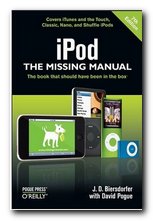
iPod: The Missing Manual

July 15, 2009 by Roy Johnson

the book that  should have been in the box

I bought an iPod recently for playing MP3 music files – and I was amazed to discover that it does a lot more than that. The iPod is simply an iPhone without the phone – and this means a lot more than you might imagine. It plays music, sure enough, but it’s also got a wireless card, and that means you can surf the Web, get your emails, watch videos on YouTube, check the weather or the state of your stock market investments – and all this from a device you can comfortably keep in your top pocket.

iPod: The Missing ManualIt has all these features – and yet it doesn’t come with a guidance manual. You can download a PDF from the iTunes site, but reading manuals on screen is no joke – and the chances are that you’ll miss some of the amazing features on this device which is in the process of revolutionising our connections with the online world. In the last year alone, more than 20,000 small applications (Apps) have been written for the iPod and iPhone – and these are so accessible and so cheap, they are driving down the price of software everywhere.

I like the approach of the missing manual series, because they’re written with users’ needs in mind. For instance, the first thing anyone buying an iPod probably wants to know is – how can I get music onto this thing and start listening? And that’s exactly what comes up first in the manual – how to download tracks from iTunes, how to import a CD, and how to organise the music to suit your own needs.

The main learning curve with the iPod is the nested menu system – and that’s fairly clearly explained. Basically, you’ve just got to drill down from one screen to another to find your stuff. But the manual is well illustrated with photos and screenshots, so that you know exactly what you should be looking at.

iPod_touchAnd nothing can go drastically wrong, so you don’t need to worry. It’s no wonder that these devices have become so popular so quickly. Quite apart from the ultra-cool design, you can download games, extras, and software novelties with no trouble at all. Many of them are completely free or amazingly cheap. For instance, the ‘Brushes’ graphic design program used to produce these stunning pictures costs only £2.99. At this price you can afford to give things a try – and it’s no tragedy if you decide not to bother.

The manual covers the iPod Touch, the Classic, the Shuffle, and the Nano, and it also gives you a full guide to iTunes – the site from which Apple hopes you will download most of your music files. They currently sell for around £0.79 per track – but companies such as Amazon are currently undercutting them at £0.49 per track in an effort to capture the market.

There are two other things I like about the Missing Manuals. One is that they are not slavishly uncritical. If there’s a shortcoming with the product, they’ll mention it. And two – they’ll show you how to get round the problem. There are call-out boxes packed with hints, tips, and hidden workarounds. I discovered a really useful feature for anybody using an iPod whilst on the move: you can locate the nearest free WiFi hot spot simply by finding your location on Google Maps, then doing a search on WiFi.

You can also download movies, audio books, games, podcasts, TV programmes. You can even couple up your iPod to your TV and watch videos on a full size screen. That’s why these slender hand-held computers are now regarded as something of a Killer Ap – because they have the capacity to combine all online services into one user-friendly, affordable device.

© Roy Johnson 2010

iPod   Buy the book at Amazon UK

iPod   Buy the book at Amazon US


David Pogue, iPod: The Missing Manual, Sebastopol: O’Reilly, 2010, pp.304, ISBN: 1449390471


More on technology
More on digital media
More on online learning
More on computers


Filed Under: Computers, Media Tagged With: Communication, Computers, iPod, iPod: The Missing Manual, Media, Technology

Irony – how to understand it

September 7, 2009 by Roy Johnson

free pages from our English Language software program

Irony – definition

irony Irony is saying (or writing) one thing, whilst meaning the opposite.

redbtn The true meaning may be conveyed by vocabulary – or even by tone.


Examples

“So you’ve lost the keys. That’s clever!”

“You’re standing on my foot – thankyou!”


Use

redbtn Irony is a means of making a critical comment by casting a topic into a new light or reversing a perspective on it.

redbtn It is often used to make witty observations.

redbtn People using irony are distancing themselves from the subject in question.

redbtn NB! Irony should not be confused with sarcasm, which is a direct remark meant to wound or offend.

redbtn There are various types of irony. They have in common the adoption of a distance from the subject for satirical or critical effect.

redbtn A speaker might take up an opponent’s argument and then exaggerate it to reveal its weaknesses. This is Socratic irony.

redbtn Writers or speakers might pretend to hold opinions which are the exact opposite of what they truly believe. [The reader or listener must be alert and skillful to avoid being drawn into a trap.]

redbtn Dramatic irony occurs when the audience at a play know something of which the characters on stage are ignorant [the lover hidden in the next room].

redbtn Irony is often classed as a form of humour, along with sarcasm and satire. These do not necessarily evoke laughter, but rather a wry shrug or assent to the idea that the received world picture has been disturbed.

Self-assessment quiz follows >>>

© Roy Johnson 2003


English Language 3.0 program
Books on language
More on grammar


Filed Under: English Language Tagged With: English language, Irony, Language

  • « Previous Page
  • 1
  • …
  • 46
  • 47
  • 48
  • 49
  • 50
  • …
  • 103
  • Next Page »

Get in touch

info@mantex.co.uk

Content © Mantex 2016
  • About Us
  • Advertising
  • Clients
  • Contact
  • FAQ
  • Links
  • Services
  • Reviews
  • Sitemap
  • T & C’s
  • Testimonials
  • Privacy

Copyright © 2026 · Mantex

Copyright © 2026 · News Pro Theme on Genesis Framework · WordPress · Log in